Is Grok Bot Worth It for a Small Business?

- Is Grok Bot worth it for a small business? Yes, when one repeating job actually leaves your plate. If what you want is one smarter chat window, it isn't.
- The lowest plan that includes it is Premium, at $30 a month on the official pricing page, checked Nov 17, 2026.
- Fill in the math box below with your own numbers, read who should skip it, then test it on one job before you commit.
You're close to paying and still not sure. That's a healthy place to be. Whether Grok Bot is worth it comes down to one thing for a small business: does a specific, repeating job move off your plate? You can check that with your own numbers before you spend much.
I'm not part of the company that makes Grok Bot, so check the official page before you pay.
This page won't promise you savings. It gives you the price, a math box for your own numbers, the real drawbacks from the official docs, and the cheapest way to find out.
Is Grok Bot worth it for a small business?
Yes, when one repeating job actually leaves your plate, like a morning inbox brief or chasing stalled leads, and you're willing to review what the bot drafts. If you mainly want a smarter chat window for one-off questions, it isn't worth it, because that's a different app.
The difference comes down to what Grok Bot is. According to the official Grok Bot overview, it gives you Bots: AI teammates with names, jobs and context that builds over time. Your Bots work on a persistent cloud computer with a browser, a file system and a terminal, so they can finish tasks in real tools, and the work continues while your laptop is closed.
I run my business with a team of Grok Bots: one front-door "chief of staff" bot that hands work to specialist bots for jobs such as inbox, leads, follow-up, scheduling and reporting. Each of those jobs comes back again and again, and that's the kind of job worth testing.
On Nov 5, 2026, a specialist finished a site-build playbook and handed it to my front-door bot, which passed it to the website team. That handoff left my plate once I had approved the work.
What does it cost?
Premium is the lowest plan that includes Grok Bot, at $30 a month or $300 a year ($25 a month), according to the official pricing docs and x.ai/pricing, checked Nov 17, 2026. List prices don't include sales tax, and the pricing page says to cancel at least 24 hours before renewal to avoid additional charges.
Grok Bot is included on Premium, Super and Ultra. Plus and Free don't include it. Super ($100 a month) and Ultra ($200 a month) give larger shared weekly allowances than Premium.
A good rule for a small business testing one job: start on Premium, and move up only if your usage page shows you running short week after week. The official pricing docs carry the current numbers, and Grok Bot Pricing and Usage Limits: What a Small Business Actually Gets walks through every plan and how the weekly allowance works.
When is it worth it?
It's worth it when you can name one job that repeats every week, say what "done" looks like, and commit to reviewing the bot's drafts. Then, if the math box below shows the time you get back is clearly worth more than the plan price, it's worth a test.
Use these four checks first:
- The job repeats. It comes back daily or weekly, not once a quarter.
- The job lives in tools. Think email, a calendar or a website. Bots work in a browser and with files, so they can do steps, not only write text.
- You can say what done looks like. "A short brief of what needs me today, action items first" is a job. "Help with marketing" is a wish.
- You'll review. Most of the templates I built draft and a person sends. If you won't read drafts, a drafting bot can't take the job from you.
Do the math with your own numbers
Fill in the blanks with honest guesses, and count the time you'll spend reviewing the bot's work.
| Line | What to fill in | Your number |
|---|
| --- | --- | --- |
|---|
| A | Hours a month you spend on the one job now | \_\_\_\_ |
|---|
| B | Hours a month you'd still spend on it with a bot (reviewing drafts, fixing mistakes, sending) | \_\_\_\_ |
|---|
| C | Hours back each month (A minus B) | \_\_\_\_ |
|---|
| D | What one hour of your time is worth to you | $\_\_\_\_ |
|---|
| E | Value of the time back (C times D) | $\_\_\_\_ |
|---|
| F | Plan price: Premium is $30 a month on the official pricing page, checked Nov 17, 2026, before tax | $30 plus tax |
|---|
| G | Extra usage credit you'd allow each month, if any (you set this limit yourself) | $\_\_\_\_ |
|---|
How to read it:
- If E is clearly bigger than F plus G, it's worth a test.
- If E and F plus G are close, the honest answer is "not yet." Pick a bigger job or tighten the one you have.
- If you can't fill in line B yet, try it first and fill in B from what you see.
The box doesn't predict a result. It puts your own numbers next to the price, and it leaves out your setup time in the first weeks, so allow for that.
A trial is how you get line B. Grok Bot Free Trial: How It Works and How to Make the Credit Last explains the two ways to try it and how to make the credit last.
Who should skip it?
Skip it if you only need answers to one-off questions, if you won't review drafts before anything goes out, or if you want a bot that sends messages on its own. In each case you'd be paying for a team of Bots and using it as something it isn't built to be.
- You only ask one-off questions. Grok, the chat assistant, is a separate app. Grok Bot is for jobs that repeat and run in real tools, and plans that include it start at Premium.
- You won't review drafts. The official docs say a Bot messages you for approval when something needs it. My own standing rule for any bot that touches the outside world is drafts only, a person approves, and for anything that sends or cancels, one yes on the item and a second yes on the exact text and recipient.
- You want a bot that sends on its own. Most of the templates I built are draft only. The Daily Email and Calendar Brief may send only to you, and the Subscription and Bill Cutter sends a cancellation only after two yeses: one on the item and a second on the exact text.
- You need walls between work. According to the official docs, all of one person's Bots share one cloud computer, including files, browser sessions and logins, and separate Bots should not be used as a security boundary. If one client's logins must stay apart from another's, plan for that before you buy.
What are the real drawbacks?
There are three: your usage is a weekly pool shared with Grok and Cursor, your Bots share one cloud computer, and you'll spend time approving things. Each one costs money, care or attention, so weigh all three against your math box before you pay.
1. A weekly shared pool. According to the official usage limits docs, each paid seat gets a weekly pool of included usage, shared across Grok, Grok Bot and Cursor, with no separate meter for Grok Bot. Different activities draw different amounts from it.
When the pool runs out, extra Grok Bot usage is paid from prepaid credit, and you can set a monthly limit on it under "Additional usage credits" at grok.com/dashboard/billing. The docs don't say how many tasks a weekly pool covers, so plan from your own usage page at grok.com/dashboard, under Usage, which shows what you've used and the next reset date.
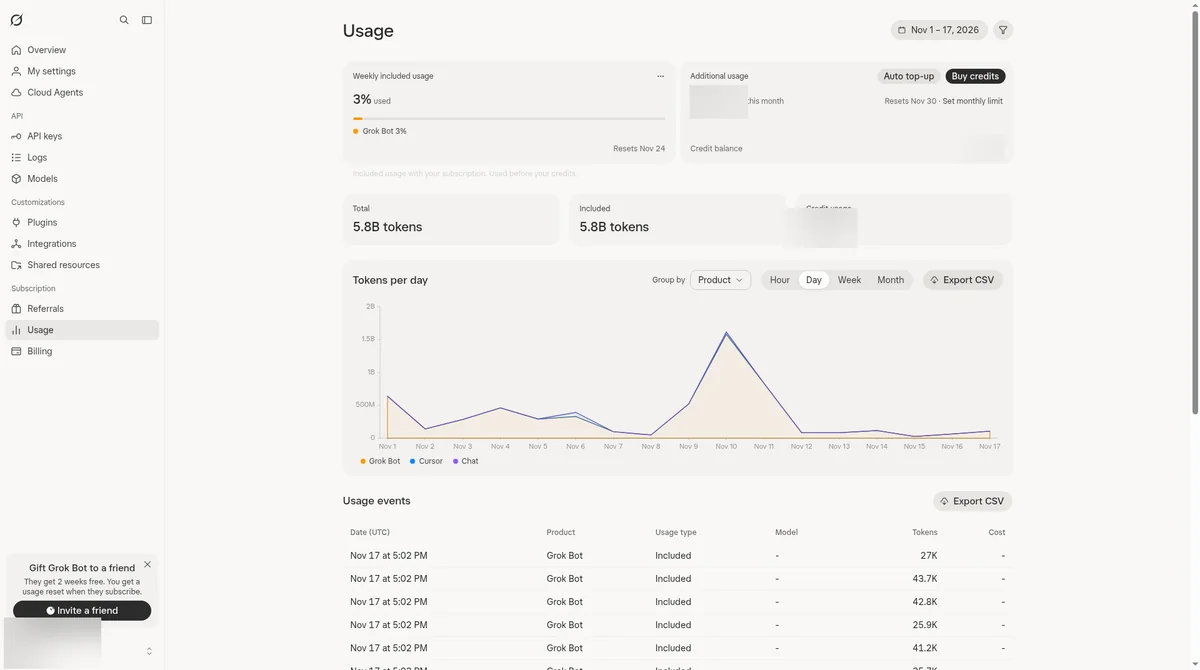
2. One shared computer. Your Bots share one cloud computer, with the same files, browser sessions and logins. A login one Bot uses is there for the others, which is why the docs warn against treating separate Bots as a security boundary.
3. You approve things. A Bot messages you when something needs your approval, and it hands a step back to you if a site blocks automation or needs a human step. That's a safety feature, and it's also your time. Count it on line B.
What is the cheapest way to find out?
Run one real job through a trial before you pay for a plan, start small, and fill in line B of the math box from what you saw. If a trial isn't offered on your account, test the same way during your first month of Premium and watch your usage page.
There are two different ways to try it, and they work differently:
- The built-in trial. The official docs describe it as a usage credit rather than a set number of days, though a 7-day window also applies. The credit is drawn down by how much work your Bots do, and one large task can use most or all of it at once. It never becomes a paid plan, and cancelling it costs nothing.
- The referral trial. This is a separate offer: a 14-day free trial of Premium through a friend's referral link. It needs a payment card and renews automatically at the checkout price unless you cancel before it ends, and it's only for people new to Grok.
One catch: the Oct 27, 2026 changelog says that where Grok Bot offered a free trial, it now offers Get Grok Bot with a unified plan, though the FAQ still shows Start Trial for some accounts.
A clear first step
- Pick one job from your math box.
- Run it once as a one-time task. The official docs advise starting with a one-time task, making it reliable, saving the method as a skill (a reusable set of instructions for a task), and only then automating it with a routine (a rule that tells one Bot when to run it, on a schedule or when something happens).
- Check your usage page after the run.
- Fill in line B and decide.
If you'd rather start from a template, the ones I built hold no personal data and work from pasted text before anything is connected. After you install one, you reinstall its connected apps, and custom scripts and MCP servers don't come along. How to Install a Grok Bot Template (and What It Actually Copies) covers what to read before you add one, and The First 3 Grok Bots Every Business Owner Should Install helps you pick which job to start with.
FAQ: is Grok Bot worth it?
Should I get Grok Bot or just use the Grok chat app?
For answers to one-off questions, the Grok chat app is a separate product, and Grok Bot isn't needed. For a repeating job that runs in real tools, Grok Bot is the one built for it, and plans that include it start at Premium.
Can you tell me how much time it will save me?
This page can't give you that number, and the official docs don't say how much work a weekly pool covers. The math box above uses your own hours and your own value per hour. Fill in line B after a real test, not before.
What happens if I run out of usage mid-week?
According to the official docs, the weekly pool resets each week, and a Bot that hits the limit isn't broken. Until the reset, extra Grok Bot usage is paid from prepaid credit, and you can set your own monthly limit on it at grok.com/dashboard/billing.
Is Premium enough for a small business?
Premium is the lowest plan with Grok Bot, and Super and Ultra give larger shared weekly allowances. The docs don't say how many tasks any plan covers. A sensible path is to start on Premium for one job and watch your usage page for a few weeks before moving up.
Can I cancel if it isn't worth it?
Yes, and the official pricing page says to cancel at least 24 hours before renewal to avoid the next charge. The built-in trial can be ended any time with Cancel Trial, which removes any remaining credit at no charge, while the referral trial renews unless you cancel before it ends.
Is it safe to connect my business accounts?
That's your call, and this isn't security advice. The official docs say all of your Bots share one cloud computer, including logins, and that separate Bots aren't a security boundary. A careful start is to test with pasted text first and connect accounts one at a time once a job works.
If one job works and you want a second, see The Payback Roadmap.
This bot is one piece of a full AI team. See how I run my business with a team of Grok bots. The AI Chief of Staff: How I Run My Business With a Team of Grok Bots