Grok Bot Pricing and Usage Limits: What a Small Business Actually Gets

- Grok Bot pricing starts at $30 a month on the Premium plan, the lowest plan that includes it. Super is $100 and Ultra is $200, and both give a larger weekly usage pool. Prices checked Nov 13, 2026, and tax is not included.
- Usage is one weekly pool shared across Grok, Grok Bot and Cursor. Different activities draw different amounts, so there is no flat message count.
- When the pool runs out, you wait for the weekly reset or pay for extra usage from prepaid credit that you control.
I'm not part of the company that makes Grok Bot, so check the official page before you pay.
This guide covers Grok Bot pricing and usage limits using only official pages, each with the date it was checked. If a number is not on an official page, you will not find it here.
How much does Grok Bot cost?
Grok Bot comes with a paid plan, and the cheapest plan that includes it is Premium at $30 a month, or $300 a year ($25 a month). That is according to the official X Subscription pricing docs and the official x.ai pricing page, with prices checked Nov 13, 2026.
A few things to know about those prices:
- Tax is not included. The official pricing page says list prices do not include sales tax.
- Prices can change. The same page says so, which is why this guide carries a check date.
- Renewal timing matters. The pricing page says to cancel at least 24 hours before renewal to avoid the next charge.
The plans are sold as "The X Subscription," which is where new customers start. Older Cursor and SuperGrok plans still exist for existing customers, according to the official Grok Bot plan docs.
Which plans include Grok Bot?
Premium, Super and Ultra include Grok Bot, while the Free and Plus plans do not. Super and Ultra cost more than Premium and give larger shared weekly allowances, according to the official docs, so they suit heavier use.
| Plan | Monthly | Annual | Included usage (official docs, compared with Plus) | Grok Bot included? |
|---|
| --- | --- | --- | --- | --- |
|---|
| Free | $0 | $0 | Limited | No |
|---|
| Plus | $8 | $80 a year ($7 a month) | Base | No |
|---|
| Premium | $30 | $300 a year ($25 a month) | 4x | Yes |
|---|
| Super | $100 | $1,000 a year ($84 a month) | 15x | Yes |
|---|
| Ultra | $200 | $2,000 a year ($167 a month) | 50x | Yes |
|---|
Source: official X Subscription pricing docs (page says "Last updated: October 11, 2026") and the official x.ai pricing page, checked Nov 13, 2026. Prices exclude sales tax.
One caution on that usage column. The official table compares each plan with Plus, not with Premium, so do not read it as an exact Premium-to-Super ratio. The same page lists Premium at 4x Plus, Super at 15x and Ultra at 50x, so the gaps are real but they are not task counts (pricing).
Team plans exist, but the pricing page does not list a team price or seat rules. It describes pooled usage, centralised billing and mixed seat types instead (pricing).

How do weekly usage limits work?
Each paid seat gets a weekly pool of included usage, shared across Grok, Grok Bot and Cursor, with no separate meter for Grok Bot. The pool refreshes every week, and different activities draw different amounts from it, according to the official usage limits docs.
What that means for a business owner:
- There is no message count. Usage rates vary by product, so a heavy bot job and a quick chat do not cost the same.
- Everything shares one pool. If you also use Grok chat or Cursor on the same seat, that work draws from the same weekly pool as your bots.
- Third-party models are separate. The docs say third-party models in Cursor are not part of the included usage.
The official pages do not say how many tasks or messages a weekly pool covers, so this guide will not guess (pricing).
If you plan to run several bots, read How to Keep a Grok Bot Team From Burning Your Weekly Usage before you set up routines.
What happens when you run out?
You have two choices when the weekly pool runs out: wait for the reset, or pay for extra Grok Bot usage from prepaid credit. The extra credit only gets used if you buy it, and you can cap how much it spends each month.
Here is the path, step by step, from the official usage limits docs and the official Grok Bot plans help page:
- Your bot tells you it hit the limit. The official Grok Bot FAQ says this does not mean it is broken. Your weekly usage is used up, and it resets each week.
- Option A: wait. Check your next reset date on the usage screen and let it refresh.
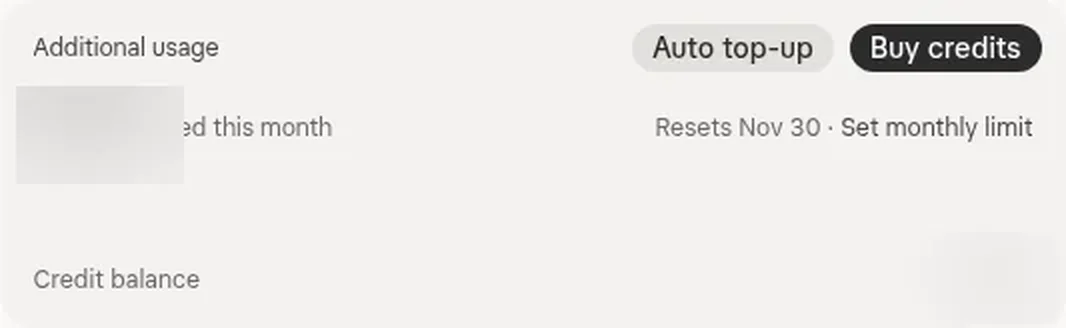
- Option B: add prepaid credit. At grok.com/dashboard/billing, under "Additional usage credits," you can buy credit, turn on Auto Top-up, and set a monthly additional usage limit.
- Set the limit before you need it. A monthly limit means extra usage can never run past a number you chose.
A good rule: set the monthly additional usage limit the same day you subscribe, even if you plan never to use it. Then a busy week cannot surprise you.
Can you try it before paying?
Yes, in two separate ways that work differently: the built-in trial is a usage credit, and the referral trial is 14 days of Premium that needs a card. Keep them apart, because only the referral trial can turn into a charge.
The built-in trial. According to the official plans help page, it is a usage credit with a 7-day window, used up by how much work your bots do. It never becomes a paid plan, and used credit is not given back.
The referral trial. According to the official referral docs, a friend's link can give a new user 14 days of Premium, but a payment card is required. It renews automatically at the checkout price unless you cancel before the trial ends.
Both trials, who qualifies and how to make the credit last are covered in Grok Bot Free Trial: How It Works and How to Make the Credit Last.
How do you check your own usage?
Go to grok.com/dashboard and open Usage, where the live view shows how much of your weekly pool you have used and when it resets next, according to the official usage docs. Check it before and after any large job, and before you start a long routine.
How to estimate for yourself. The official pages give no task counts, so your own usage screen is the only reliable guide. Here is a simple method:
- Note where you start. Open Usage at the start of your week and write down how much is used and the reset date.
- Run one normal day. Use your bots the way you actually would.
- Check after each big job. Open Usage again after any long or large task, and note how much it moved.
- Look at the week. By the reset date, you will know whether your normal week fits inside the pool, or runs out early.
That one week of your own numbers is worth more than any estimate from a website, including this one.
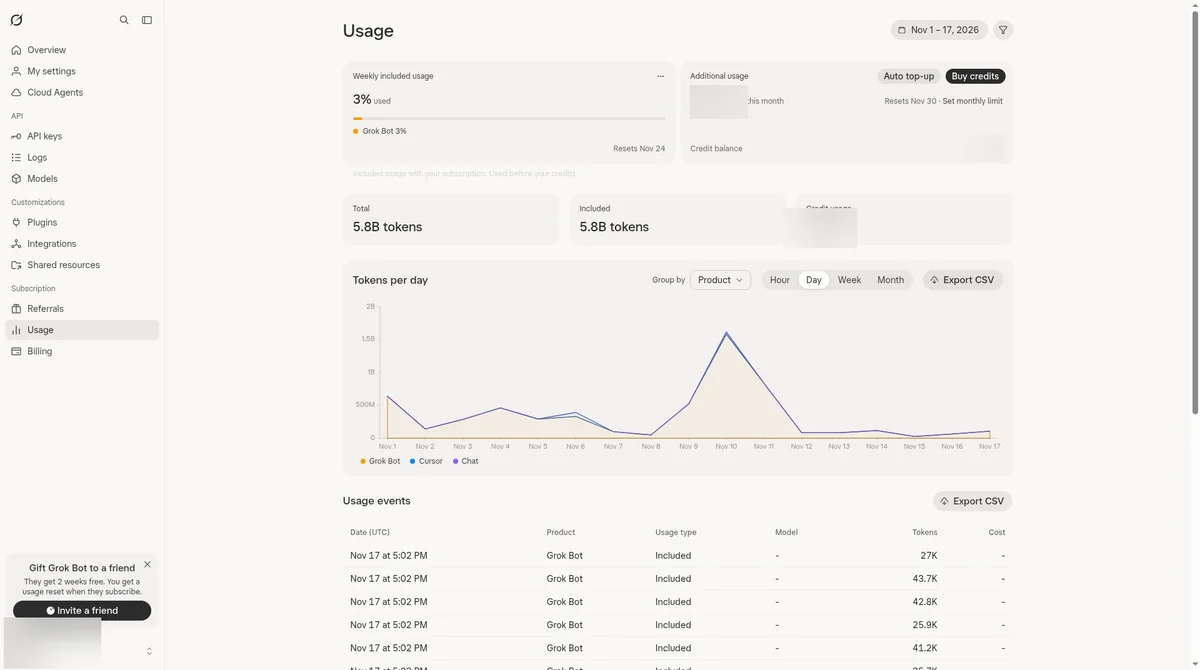
If a referral usage reset is ever added to your account, it shows under Settings > Usage once resets are enabled, according to the official docs.
What should a small business pick?
Start on Premium, the lowest plan that includes Grok Bot, and watch your usage screen for one full week. If your normal week fits, stay; if you run out regularly, compare adding prepaid credit with a monthly limit against moving up to Super or Ultra.
A decision rule, built only from the official facts above:
- Start on Premium, monthly. Monthly lets you change plans once you know your real usage. Annual costs less per month, but commits you for a year.
- Set a monthly additional usage limit under Additional usage credits on day one.
- Watch one full week using the method above.
- If you run out once in a while, let the reset or a small amount of prepaid credit cover it.
- If you run out most weeks, look at Super or Ultra, which give larger weekly pools, and compare that with what you are paying in extra credit.
Whether the cost is worth it for your business is a separate question, covered in Is Grok Bot Worth It for a Small Business?. If you want a set of ready-to-install bots, in order, that look for money before they ask you to spend more of it, see The Payback Roadmap.
Grok Bot pricing FAQ
Does the Plus plan include Grok Bot?
No. According to the official docs, Grok Bot is included on Premium, Super and Ultra, and not on Free or Plus.
Does Grok Bot have its own usage limit?
No. The official usage docs say each paid seat gets one weekly pool shared across Grok, Grok Bot and Cursor, with no separate meter for Grok Bot.
How many tasks can I run in a week?
The official pages do not give a number, because different activities draw different amounts from the pool. Use your own usage screen for a week to find out (pricing).
Do the prices include tax?
No. The official pricing page says list prices do not include sales tax, and prices are subject to change.
My bot says it hit the limit. Is something broken?
No. The official Grok Bot FAQ says the weekly usage is used up and resets each week. You can wait for the reset or add prepaid credit.
How do I avoid an unwanted renewal charge?
The official pricing page says to cancel at least 24 hours before renewal to avoid the next charge. Put the date in your calendar when you subscribe.
This bot is one piece of a full AI team. See how I run my business with a team of Grok bots. The AI Chief of Staff: How I Run My Business With a Team of Grok Bots