How to Keep a Grok Bot Team From Burning Your Weekly Usage

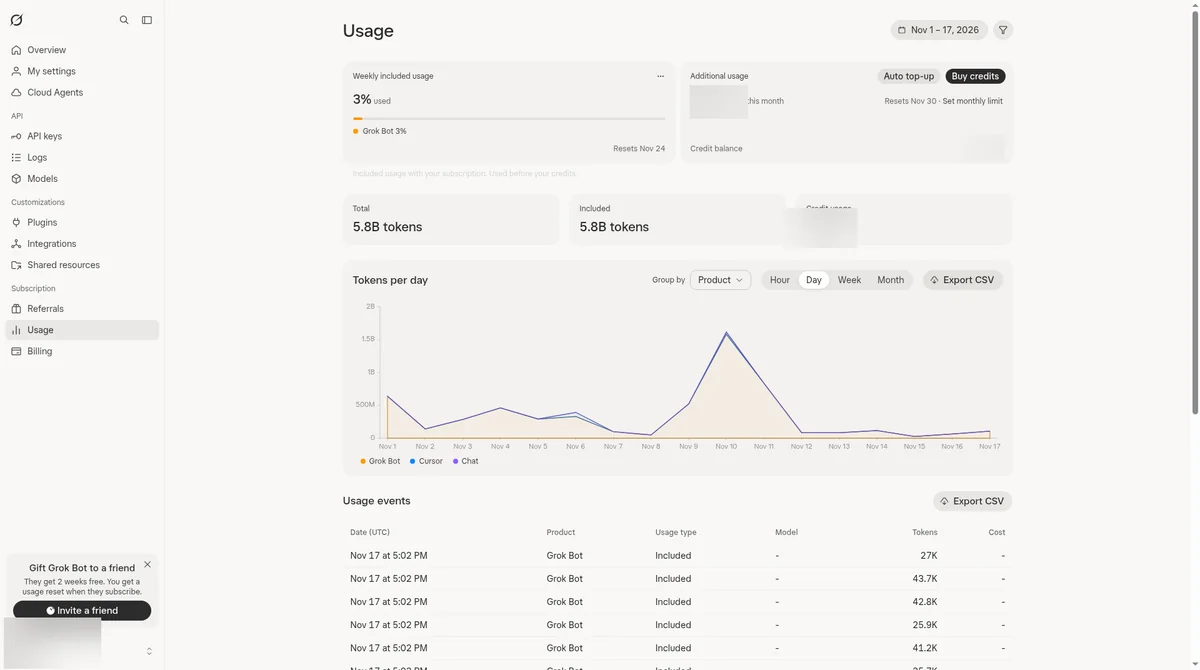
- Grok Bot usage comes from one weekly pool shared across Grok, Grok Bot and Cursor. Every bot on your team draws from the same pool.
- The habits that keep it predictable: one front-door bot, tight jobs, one owner per handoff, small tests before anything runs on a schedule, and drafts before anything sends.
- Look at your Usage screen on the same day every week. If you run out anyway, wait for the reset or add prepaid credit with a monthly limit.
I'm not part of the company that makes Grok Bot, so check the official page before you pay.
If you run more than one bot, Grok Bot usage stops being something you can ignore. Several bots doing work at once all draw from one weekly pool, and a team that passes work around carelessly can use it faster than you expect.
This guide covers habits, not promises. None of them guarantees a number. They keep your usage predictable, so a busy week does not catch you off guard. These figures are measured. On Nov 1, 2026, weekly usage was at 87.3%, and I paused automatic routines until the Nov 3 reset (that reset was at 11:04 AM Eastern Time). I do not have a recorded reading from right after that reset. On Nov 11, 2026, I paused unfinished website work at 67% weekly usage until the Nov 17 reset.
How do you keep a Grok Bot team from using up your weekly usage?
Give every bot a tight job, give every handoff one owner, test new jobs small before they run on a schedule, and look at your Usage screen once a week. Those habits keep your team's usage predictable, so you see trouble coming instead of finding it when a bot stops.
Here is the usage habits checklist I would hold any Grok Bot team to:
- One front door. I run my team with one front-door "chief of staff" bot that hands work to specialist bots. You talk to one bot, and it routes the job, instead of you sending the same request to three bots.
- Tight jobs. Each bot has one clear job with a clear finished state. A vague job keeps a bot taking steps.
- One owner per handoff. Every task has exactly one bot responsible at each stage.
- Bots ask before messaging other bots. There is no off switch, so you tell them.
- Small tests first. Run a new job once by hand, then make it a skill, then a routine.
- Drafts before sends. A bot drafts, a person approves, and anything that sends or cancels needs two yeses.
- Check before big jobs. Look at Usage before you start anything large or long.
- A weekly look at Usage. Same day, every week.
- A cap on extra spending. Set a monthly additional usage limit, even if you never plan to use it.
Each habit is explained below, with the official source behind it.
How does weekly usage work?
Each paid seat gets one weekly pool of included usage, shared across Grok, Grok Bot and Cursor, with no separate meter for Grok Bot. The pool refreshes every week, and different activities draw different amounts from it, according to the official usage limits docs.
What that means for a team of bots:
- Every bot shares the same pool. There is no per-bot allowance. Five bots doing work all draw from one weekly total.
- Other products count too. If you also use Grok chat or Cursor on the same seat, that work comes from the same pool.
- There is no message count. Usage rates vary by product and activity, so a heavy job and a quick question do not cost the same.
- Third-party models in Cursor are separate. The docs say they are not part of the included usage.
The official pages do not say how many tasks a weekly pool covers, so this guide will not guess.
Your weekly check routine. Pick one day, the same day every week, and do this:
- Open grok.com/dashboard and go to Usage. The live view shows how much you have used and your next reset date.
- Note how much of the pool is gone and how many days are left before the reset.
- List the jobs your bots ran that week, especially anything large or scheduled.
- Look for doubles: two bots doing the same job, or a routine running more often than you meant.
- Change one thing at a time, and check again the same day next week.
For plan sizes and what each plan includes, see Grok Bot Pricing and Usage Limits: What a Small Business Actually Gets.

Why do handoffs matter for usage?
A handoff is one bot passing work to another, and every bot that works on a task draws from your pool. The official docs advise one owner at each stage and warn that parallel handoffs create duplicate work and noisy updates, so two bots on one job means the work, and its usage, happens twice.
According to the official chat and collaboration docs, a Bot can send a message to another Bot. The receiving Bot wakes up, does the work and can reply later, and you can see the handoff in the conversation.
That is useful, and it is also where usage leaks. Here is how to keep handoffs clean:
- One owner per stage. Every handoff names one bot that owns the next step. If two bots both think a task is theirs, both work on it.
- A clear deliverable. "Draft a reply to this email" has an end. "Look into this" does not.
- Group chats with a stated outcome. The docs allow group chats of two to six Bots, with a shared outcome and a named owner for the next step. A group with no stated outcome invites everyone to chime in.
- No unasked bot-to-bot messages. There is no setting that stops Bots from messaging each other, so you tell them. More on that below.
My own team follows handoff rules and usage rules I wrote, so each specialist knows when work is theirs. If you want to build a front-door setup, see How to Set Up an AI Chief of Staff With Grok Bots.
What jobs should you test small first?
Test every new job small before it runs on its own, and especially anything long, large or scheduled. The official docs advise starting with a one-time task, making it reliable, saving the method as a skill, and only then automating it with a routine.
Two terms, in plain words. A skill is a saved set of instructions for how to do a task. A routine tells one bot when to run a job, on a schedule or when something happens, and it runs in the cloud while your laptop is closed, according to the official skills and routines docs.
Why test small: the official Grok Bot plans help page gives the same advice for making a trial credit last. Start small, scope tasks tightly, scale up once you see how much each task uses, and check usage before running large or long jobs. That advice is written for the trial, but the habit carries over to a paid weekly pool.
Jobs to test small first:
- Anything that runs on a schedule. A routine that runs every day repeats its cost every day.
- Anything triggered by events. A routine that fires on every new email or Slack message can run more often than you expect.
- Anything long or open-ended. Research, big batches and multi-step jobs.
- Anything that hands work to other bots. Watch the first few handoffs to be sure only one bot picks up each task.
When you do create a routine, the docs say to confirm six things: the owning bot, the schedule and time zone, the input source, the expected result, the approval boundary, and what happens if a source is missing.
If you are just starting out, a smaller team is easier to watch. See The First 3 Grok Bots Every Business Owner Should Install.
What rules should every bot follow?
Every bot that touches the outside world should follow three rules: drafts only, a person approves, and two yeses for anything that sends or cancels. And every bot should be told, in plain words, to ask you before it messages another bot.
My standing rules for bots that touch the outside world:
- Drafts only. The bot writes. A person sends.
- A person approves. Nothing leaves without someone looking at it.
- Two yeses for anything that sends or cancels. One yes on the item, and a second yes on the exact text and recipient.
These rules keep you from redoing work a bot got wrong, which is a habit worth having whatever it does to usage.
The instruction the docs suggest. Since there is no switch to stop Bots messaging each other, the official docs give an example of what to tell them: "Don't message other Bots. Ask me first." Then ask each bot to remember it. That keeps bots from starting new work with each other that you did not ask for.
What if you run out anyway?
You have two choices: wait for your weekly reset, or pay for extra Grok Bot usage from prepaid credit. Running out does not mean anything is broken, since the official FAQ says the weekly usage is simply used up and resets each week.
Here is the path, from the official usage limits docs and the official Grok Bot FAQ:
- Your bot says it hit the limit. That means your weekly usage is used up. It resets each week.
- Option A: wait. Check your next reset date on the Usage screen.
- Option B: add prepaid credit. At grok.com/dashboard/billing, under "Additional usage credits," you can buy credit, turn on Auto Top-up, and set a monthly additional usage limit.
A good rule: set that monthly limit before you ever need it. Then even a bad week has a ceiling you chose.
After you run out, use your weekly check to find out why. Look for the job that ran longer than planned, the routine that fired too often, or the task two bots both picked up.
Grok Bot usage FAQ
Does each bot get its own usage limit?
No. The official docs say each paid seat gets one weekly pool shared across Grok, Grok Bot and Cursor. Every bot on your team draws from that one pool.
How many tasks can my bots run in a week?
The official pages do not give a number. Different activities draw different amounts, so your own Usage screen is the only reliable guide.
Do more bots mean more usage?
Every bot's work comes from the same weekly pool, so more work means more draw. Watch how much work the bots do, and whether two of them are doing the same job.
My bot says it hit the limit. Is it broken?
No. The official FAQ says the weekly usage is used up and it resets each week. You can wait or add prepaid credit.
Can I cap how much extra usage costs?
Yes. Under "Additional usage credits" at grok.com/dashboard/billing, you can set a monthly additional usage limit, according to the official usage docs.
If you want a set of ready-to-install bots, in order, that look for money before they ask you to spend more of it, see The Payback Roadmap.
This bot is one piece of a full AI team. See how I run my business with a team of Grok bots. The AI Chief of Staff: How I Run My Business With a Team of Grok Bots